|
|

|

Toolbar and menu personalization
In SaVoir it is possible to customise the main window toolbars, the main menu and all the contextual menus by adding or removing commands.
To this end, the user activates the GUI customisation mode by right-clicking on the menu bar and by selecting the Customize command from the contextual menu.

This will open the customize dialogue window.

Customising a toolbar or a menu
We will add the "Measure Distance" command to the main toolbar:
-
Open the Customize dialogue, Commands tab, Tools menu, and select the Distance command

-
Add the menu to the main toolbar by dragging from the Customize dialogue and dropping on the toolbar.
-
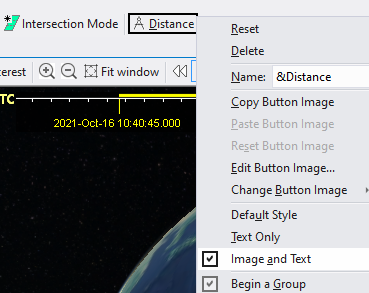
If needed, edit the new menu by setting a new icon or displaying the menu with text and image,
-
To remove a menu just drag it off the toolbar.
-
The same drag & drop actions will work on customized menus, same as toolbars.
Multisatellite Swath Planner - © Taitus Software Italia srl All rights reserved- info: support@taitus.it